楼主 #1 2018-09-08 16:39:25 分享评论
- 晕哥
- 管理员

- 所在地: wechat: whycan_cn
- 注册时间: 2017-09-06
- 已发帖子: 9,520
- 积分: 9207
wrtnode 添加相关设备树、注册一个led灯, 注册一个按钮 【转】
wrtnode 添加相关设备树、注册一个led灯, 注册一个按钮
参考链接: 将GPIO注册为一个led灯、按钮
修改 dts 文件
gpio-leds {
compatible = "gpio-leds";
indicator {
label = "wrtnode:blue:indicator";
gpios = <&gpio1 14 1>;
};
};
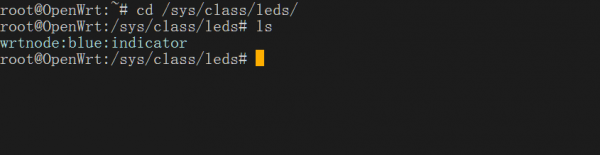
compatible要与Led的驱动leds-gpio.c里compatible对应。label是设备的名字,在文件系统/sys/class/leds/目录下设备名对应
gpios = <&gpio1 14 1>,这是指定对应的gpio引脚(GPIO#38)

注册一个按键:
gpio-keys-polled {
compatible = "gpio-keys-polled";
#address-cells = <1>;
#size-cells = <0>;
poll-interval = <20>;
reset {
label = "reset";
gpios = <&gpio0 1 1>;
linux,code = <0x198>;
};
};
离线
楼主 #2 2018-09-08 16:42:31 分享评论
- 晕哥
- 管理员
- 所在地: wechat: whycan_cn
- 注册时间: 2017-09-06
- 已发帖子: 9,520
- 积分: 9207
Re: wrtnode 添加相关设备树、注册一个led灯, 注册一个按钮 【转】
按照以上的套路, 在 V3s 系统添加一个 led:
https://github.com/Lichee-Pi/linux/blob/zero-4.13.y/arch/arm/boot/dts/sun8i-v3s-licheepi-zero.dts
leds {
compatible = "gpio-leds";blue_led {
label = "licheepi:blue:usr";
gpios = <&pio 6 1 GPIO_ACTIVE_LOW>; / PG1 /
};green_led {
label = "licheepi:green:usr";
gpios = <&pio 6 0 GPIO_ACTIVE_LOW>; / PG0 /
default-state = "on";
};red_led {
label = "licheepi:red:usr";
gpios = <&pio 6 2 GPIO_ACTIVE_LOW>; / PG2 /
};
};
离线
楼主 #3 2018-09-08 17:02:54 分享评论
- 晕哥
- 管理员
- 所在地: wechat: whycan_cn
- 注册时间: 2017-09-06
- 已发帖子: 9,520
- 积分: 9207
离线
东莞哇酷科技有限公司开发