- 首页
- » 搜索
- » dml1048147924 发表的帖子
页次: 1
#1 Openwrt/LEDE/AR9331/MT7688/RT5350 » kernel panic - not syncing: VFS: Unable to mount root fs on unknown-bl » 2023-03-14 16:31:43
- dml1048147924
- 回复: 0
openwrt 启动失败
0A
[ 0.523542] printk: console [ttyS0] enabled
[ 0.523542] printk: console [ttyS0] enabled
[ 0.540018] printk: bootconsole [early0] disabled
[ 0.540018] printk: bootconsole [early0] disabled
[ 0.559298] 10000d00.uart1: ttyS1 at MMIO 0x10000d00 (irq = 29, base_baud = 2500000) is a 16550A
[ 0.578312] spi-mt7621 10000b00.spi: sys_freq: 193333333
[ 0.605792] spi-nor spi0.0: w25q128 (16384 Kbytes)
[ 0.615337] mtd: spi0.0: partitioning exceeds flash size, truncating
[ 0.627921] mtd: spi0.0: skipping zero sized partition
[ 0.638093] mtd: spi0.0: partitioning exceeds flash size, truncating
[ 0.650672] mtd: spi0.0: skipping zero sized partition
[ 0.660847] 4 cmdlinepart partitions found on MTD device spi0.0
[ 0.672569] Creating 4 MTD partitions on "spi0.0":
[ 0.682081] 0x000000000000-0x000000030000 : "u-boot"
[ 0.692905] 0x000000030000-0x000000040000 : "u-boot-env"
[ 0.704401] 0x000000040000-0x000000050000 : "art"
[ 0.714768] 0x000000050000-0x000001000000 : "firmware"
[ 0.727069] libphy: Fixed MDIO Bus: probed
[ 0.748500] rt3050-esw 10110000.esw: link changed 0x00
[ 0.759933] mtk_soc_eth 10100000.ethernet: generated random MAC address 16:6c:2c:86:f4:08
[ 0.776932] mtk_soc_eth 10100000.ethernet eth0: mediatek frame engine at 0xb0100000, irq 5
[ 0.793539] PPP generic driver version 2.4.2
[ 0.802276] usbcore: registered new interface driver qmi_wwan
[ 0.813768] usbcore: registered new interface driver cdc_wdm
[ 0.825209] usbcore: registered new interface driver usbserial_generic
[ 0.838241] usbserial: USB Serial support registered for generic
[ 0.850229] usbcore: registered new interface driver option
[ 0.861345] usbserial: USB Serial support registered for GSM modem (1-port)
[ 0.903095] NET: Registered protocol family 10
[ 0.915133] Segment Routing with IPv6
[ 0.922609] NET: Registered protocol family 17
[ 0.931475] 8021q: 802.1Q VLAN Support v1.8
[ 0.942915] Too few erase blocks (1)
[ 0.950085] List of all partitions:
[ 0.957007] 1f00 192 mtdblock0
[ 0.957011] (driver?)
[ 0.969961] 1f01 64 mtdblock1
[ 0.969963] (driver?)
[ 0.982909] 1f02 64 mtdblock2
[ 0.982912] (driver?)
[ 0.995862] 1f03 16064 mtdblock3
[ 0.995864] (driver?)
[ 1.008803] No filesystem could mount root, tried:
[ 1.008805] squashfs
[ 1.018461] jffs2
[ 1.022954]
[ 1.029870] Kernel panic - not syncing: VFS: Unable to mount root fs on unknown-block(31,2)
[ 1.046402] Rebooting in 1 seconds..
#2 Re: 全志 SOC » v3s sd卡启动 , 有报错 » 2022-05-06 10:39:47
哇酷小二 wrote:
[ 4.269067] Kernel panic - not syncing: No working init found. Try passing init= option to kernel. See Linux Documentation/admin-guide/init.rst for guidance.检查您的 bootargs 参数 init= 是啥
刚开始报 的警告: warning bad CRC 是不是也有问题呀
#3 全志 SOC » v3s sd卡启动 , 有报错 » 2022-05-05 14:15:15
- dml1048147924
- 回复: 3
[ 4.238313] EXT4-fs (mmcblk0p2): recovery complete
[ 4.243141] EXT4-fs (mmcblk0p2): mounted filesystem with ordered data mode. Opts: (null)
[ 4.251405] VFS: Mounted root (ext4 filesystem) on device 179:2.
[ 4.258995] devtmpfs: error mounting -2
[ 4.264136] Freeing unused kernel memory: 1024K
[ 4.269067] Kernel panic - not syncing: No working init found. Try passing init= option to kernel. See Linux Documentation/admin-guide/init.rst for guidance.
[ 4.283237] Rebooting in 5 seconds..
U-Boot SPL 2018.07 (May 10 2020 - 20:16:13 -0700)
DRAM: 64 MiB
Trying to boot from MMC1
U-Boot 2018.07 (May 10 2020 - 20:16:13 -0700) Allwinner Technology
CPU: Allwinner V3s (SUN8I 1681)
Model: Lichee Pi Zero
DRAM: 64 MiB
MMC: SUNXI SD/MMC: 0
Loading Environment from FAT... *** Warning - bad CRC, using default environment
Failed (-5)
Setting up a 800x480 lcd console (overscan 0x0)
dotclock: 33000kHz = 33000kHz: (1 3MHz 66) / 6
In: serial@01c28000
Out: serial@01c28000
Err: serial@01c28000
Net: No ethernet found.
starting USB...
No controllers found
Unable to read file logo.bin
There is no valid bmp file at the given address
Hit any key to stop autoboot: 0
SF: Detected mx25l12805 with page size 256 Bytes, erase size 64 KiB, total 16 MiB
3563296 bytes read in 162 ms (21 MiB/s)
13463 bytes read in 2 ms (6.4 MiB/s)
Flattened Device Tree blob at 41800000
Booting using the fdt blob at 0x41800000
Loading Device Tree to 42df9000, end 42dff496 ... OK
Starting kernel ...
[ 0.000000] Booting Linux on physical CPU 0x0
[ 0.000000] Linux version 4.18.8-licheepi-zero (v3s@ubuntu) (gcc version 6.3.1 20170109 (Linaro GCC 6.3-2017.02)) #38 SMP Wed Apr 27 15:58:23 CST 2022
[ 0.000000] CPU: ARMv7 Processor [410fc075] revision 5 (ARMv7), cr=10c5387d
[ 0.000000] CPU: div instructions available: patching division code
[ 0.000000] CPU: PIPT / VIPT nonaliasing data cache, VIPT aliasing instruction cache
[ 0.000000] OF: fdt: Machine model: Lichee Pi Zero with Dock
[ 0.000000] Memory policy: Data cache writealloc
[ 0.000000] random: get_random_bytes called from 0xc0800920 with crng_init=0
[ 0.000000] percpu: Embedded 16 pages/cpu @(ptrval) s34444 r8192 d22900 u65536
[ 0.000000] Built 1 zonelists, mobility grouping on. Total pages: 15883
[ 0.000000] Kernel command line: console=ttyS0,115200 panic=5 rootwait root=/dev/mmcblk0p2 earlyprintk rw vt.global_cursor_default=0
[ 0.000000] Dentry cache hash table entries: 8192 (order: 3, 32768 bytes)
[ 0.000000] Inode-cache hash table entries: 4096 (order: 2, 16384 bytes)
[ 0.000000] Memory: 54612K/64036K available (5120K kernel code, 280K rwdata, 1368K rodata, 1024K init, 224K bss, 9424K reserved, 0K cma-reserved, 0K highmem)
[ 0.000000] Virtual kernel memory layout:
[ 0.000000] vector : 0xffff0000 - 0xffff1000 ( 4 kB)
[ 0.000000] fixmap : 0xffc00000 - 0xfff00000 (3072 kB)
#4 全志 SOC » licheepi zero v3s 不停的重启 » 2022-04-25 10:49:31
- dml1048147924
- 回复: 2
[ 3.822091] sun4i-codec 1c22c00.codec: Failed to register our card
[ 3.829579] Registering SWP/SWPB emulation handler
[ 3.835460] Loading compiled-in X.509 certificates
[ 3.845141] simple-framebuffer 43e89000.framebuffer: framebuffer at 0x43e89000, 0x177000 bytes, mapped to 0x(ptrval)
[ 3.855788] simple-framebuffer 43e89000.framebuffer: format=x8r8g8b8, mode=800x480x32, linelength=3200
[ 3.871945] Console: switching to colour frame buffer device 100x30
[ 3.885108] simple-framebuffer 43e89000.framebuffer: fb0: simplefb registered!
[ 3.894089] sun4i-codec 1c22c00.codec: ASoC: Failed to create component debugfs directory
[ 3.903989] sun4i-codec 1c22c00.codec: Codec <-> 1c22c00.codec mapping ok
[ 3.913944] sun6i-rtc 1c20400.rtc: setting system clock to 1970-01-01 00:01:02 UTC (62)
[ 3.922381] vcc5v0: disabling
[ 3.925426] ALSA device list:
[ 3.928395] #0: V3s Audio Codec
[ 3.932848] random: fast init done
[ 3.957417] random: crng init done
[ 5.910001] jffs2: notice: (1) jffs2_build_xattr_subsystem: complete building xattr subsystem, 0 of xdatum (0 unchecked, 0 orphan) and 0 of xref (0 dead, 0 orphan) found.
[ 5.929620] VFS: Mounted root (jffs2 filesystem) on device 31:5.
[ 5.937009] devtmpfs: mounted
[ 5.941312] Freeing unused kernel memory: 1024K
[ 5.976180] Kernel panic - not syncing: No working init found. Try passing init= option to kernel. See Linux Documentation/admin-guide/init.rst for guidance.
[ 5.990360] Rebooting in 5 seconds..
U-Boot SPL 2018.07 (Apr 27 2020 - 23:10:48 -0700)
DRAM: 64 MiB
Trying to boot from sunxi SPI
U-Boot 2018.07 (Apr 27 2020 - 23:10:48 -0700) Allwinner Technology
CPU: Allwinner V3s (SUN8I 1681)
Model: Lichee Pi Zero
DRAM: 64 MiB
MMC: SUNXI SD/MMC: 0
Setting up a 800x480 lcd console (overscan 0x0)
dotclock: 33000kHz = 33000kHz: (1 3MHz 66) / 6
In: serial@01c28000
Out: serial@01c28000
Err: serial@01c28000
Net: eth-1: ethernet@1c30000
starting USB...
No controllers found
SF: Detected mx25l12805 with page size 256 Bytes, erase size 64 KiB, total 16 MiB
device 0 offset 0x80000, size 0x150000
SF: 1376256 bytes @ 0x80000 Read: OK
Hit any key to stop autoboot: 0
SF: Detected mx25l12805 with page size 256 Bytes, erase size 64 KiB, total 16 MiB
device 0 offset 0x1d0000, size 0x4000
SF: 16384 bytes @ 0x1d0000 Read: OK
device 0 offset 0x1e0000, size 0x360000
#5 全志 SOC » v3s 内核运行不起来 » 2022-01-19 16:42:21
- dml1048147924
- 回复: 1
内核起不来了,请问是什么原因

#6 全志 SOC » V3s 支持多大的sd卡 » 2022-01-05 15:23:00
- dml1048147924
- 回复: 1
V3s 支持最大的sd卡是多少
#7 全志 SOC » v3s linux 应用层 如何接收红外信号 » 2021-12-17 13:19:37
- dml1048147924
- 回复: 1
v3s linux 应用层 如何接收红外信号
#8 全志 SOC » v3s linux 应用层能接受 GPIO引脚输入的红外信号吗 » 2021-12-15 14:12:24
- dml1048147924
- 回复: 0
各位大神, v3s linux 应用层能接受 GPIO引脚输入的红外信号吗
#9 全志 SOC » licheepi zero (v3s):用户程序读取串口输入数据 » 2021-12-06 17:44:24
- dml1048147924
- 回复: 4
用户程序怎么读取串口输入数据, 底层驱动收到串口数据,如何通知应用层,接受
#10 Re: 全志 SOC » v3s 能实现精准采样吗, 每隔50us 读取gpio引脚的输入电平值, » 2021-11-05 14:59:53
阿黄 wrote:
dml1048147924 wrote:
阿黄 wrote:
@dml1048147924
不能用边沿中断吗射频信号,高低电平一直在跳变,边沿触发也没用呀
50us一次跳边沿,处理才几us,占用也不大啊
大神,没有听太明白,可以详细解释一下吗
#11 Re: 全志 SOC » v3s 能实现精准采样吗, 每隔50us 读取gpio引脚的输入电平值, » 2021-11-04 13:09:30
阿黄 wrote:
@dml1048147924
不能用边沿中断吗
射频信号,高低电平一直在跳变,边沿触发也没用呀
#12 全志 SOC » v3s开启 GPIO中断 » 2021-11-04 11:22:55
- dml1048147924
- 回复: 1
v3s 如何 开启 GPIO中断
#13 Re: 全志 SOC » licheepi zero :如何制作成img格式的烧录文件 » 2021-11-04 10:55:54
哇酷小二 wrote:
不好意思,没看清题目。
荔枝派的SDK你没有办法用phone suit烧录,套路不同。
有什么方法,可以将uboot ,zimage ,dtb,fs, 打包成.img格式的文件
#14 Re: 全志 SOC » v3s 能实现精准采样吗, 每隔50us 读取gpio引脚的输入电平值, » 2021-11-04 10:47:34
卓林 wrote:
linux是非实时操作系统,应用层程序不可能实现精准的时间控制,楼上说的对,需要硬件中断的驱动去做。
大神说的很有道理,
如果用IO中断去做,射频输入信号,是一直都有的,如果开启中断,那v3s将一直处于GPIO 中断中
#15 全志 SOC » licheepi zero :GPIO引脚,输入电平值更新频率 » 2021-11-03 17:22:33
- dml1048147924
- 回复: 0
请问,v3s 内核驱动gpio输入引脚电平值更新的频率
#16 Re: 全志 SOC » v3s 能实现精准采样吗, 每隔50us 读取gpio引脚的输入电平值, » 2021-11-03 17:20:09
zzm24 wrote:
用IO中断,实测f1c100s可以稳定解码NEC红外
v3s跑的linux,能解码射频信号吗
#17 Re: 全志 SOC » v3s 能实现精准采样吗, 每隔50us 读取gpio引脚的输入电平值, » 2021-11-03 16:24:10
webb_2002 wrote:
可以的。采用中断方式。或者捕获方式。
大神可以说的具体一点吗,我的v3s上跑的linux系统
#18 全志 SOC » v3s 能实现精准采样吗, 每隔50us 读取gpio引脚的输入电平值, » 2021-11-03 10:54:27
- dml1048147924
- 回复: 10
我尝试用usleep ,nanosleep,select 函数,好像都不行,
能否像单片机stm32 一样,采集GPIO引脚射频输入信号。
#19 全志 SOC » licheepi zero 如何读取GPIO 输入电平值, » 2021-10-29 10:41:57
- dml1048147924
- 回复: 1
请教,怎么读取GPIO 引脚的输入电平值,比如检测PG4引脚输入电平的变化
#20 Re: 全志 SOC » licheepi zero :如何制作成img格式的烧录文件 » 2021-10-21 17:40:45
哇酷小二 wrote:
大神,您发得文件看不明白呀:)
#21 全志 SOC » licheepi zero :如何制作成img格式的烧录文件 » 2021-10-21 17:12:58
- dml1048147924
- 回复: 7
之前将 uboot , kernel , fs 打包成.bin 用sunxi-fel.exe烧录。
怎么将这些文件打包成.img 格式的,用phone suit 烧录
#22 计算机图形/GUI/RTOS/FileSystem/OpenGL/DirectX/SDL2 » little vgl page 上的对象,不能上下滑动 » 2021-09-26 17:15:06
- dml1048147924
- 回复: 0
little vgl 版本7.7.2
通过lv_page_create 创建的页面上,创建有很多条目列表,为什么不能上下滑动,很奇怪
#23 全志 SOC » licheepi zero :控制GPIO引脚 » 2021-06-19 14:20:15
- dml1048147924
- 回复: 1
请问:应用层如何控制底层的GPIO引脚,输出高低电平,具体步骤是怎样的
#24 全志 SOC » licheepi 串口参数怎么查看 » 2021-04-25 15:32:10
- dml1048147924
- 回复: 1
请问licheepi zero 串口参数怎么查看,波特率,奇偶校验位,停止位,起始位,数据宽度
#25 Re: 全志 SOC » PhoenixSuit烧写v3s 固件 » 2021-03-01 15:51:46
raspberryman wrote:
和多少M有关系吗?
我的意思是我们产品是flash 启动方式,不是TF卡启动方式,
bin格式的烧录文件能不能转成img格式的
#26 Re: 全志 SOC » PhoenixSuit烧写v3s 固件 » 2021-03-01 11:59:45
我们产品用的是16M norflash,
#27 全志 SOC » PhoenixSuit烧写v3s 固件 » 2021-03-01 11:11:35
- dml1048147924
- 回复: 5
据说phoenixSuit 烧写比suxi-fel.exe快很多,
但是烧写文件需要的是img格式的,但是平时我们用bin格式的(linux dd命令制作的), 怎么将bin格式的转换成img格式的呢,或者如何制作xxx.img格式的烧录文件
求大神
#28 全志 SOC » licheepi zero 0 报错 No MAC Management Counters available » 2020-08-27 16:53:02
- dml1048147924
- 回复: 1
route: SIOCADDRT: File exists
[ 15.765022] dwmac-sun8i 1c30000.ethernet eth0: Link is Up - 100Mbps/Full - flow control rx/tx
[ 16.001324] Generic PHY stmmac-0:01: attached PHY driver [Generic PHY] (mii_bus:phy_addr=stmmac-0:01, irq=POLL)
[ 16.013444] dwmac-sun8i 1c30000.ethernet eth0: No MAC Management Counters available
[ 16.021224] dwmac-sun8i 1c30000.ethernet eth0: PTP not supported by HW
[ 19.125024] dwmac-sun8i 1c30000.ethernet eth0: Link is Up - 100Mbps/Full - flow control rx/tx
#29 Re: 全志 SOC » v3s 内自己写的一个程序(scan)异常停止,请问 为啥 » 2020-06-22 13:13:16
请问是不是由于内存泄漏造成的
#30 全志 SOC » v3s 内自己写的一个程序(scan)异常停止,请问 为啥 » 2020-06-17 10:40:19
- dml1048147924
- 回复: 4
[60601.075449] scan invoked oom-killer: gfp_mask=0x6200ca(GFP_HIGHUSER_MOVABLE), nodemask=(null), order=0, oom_score_adj=0
[60601.086312] CPU: 0 PID: 292 Comm: scan Not tainted 4.18.8-licheepi-zero #15
[60601.093266] Hardware name: Allwinner sun8i Family
[60601.097968] Function entered at [<c010f248>] from [<c010bc78>]
[60601.103794] Function entered at [<c010bc78>] from [<c0587680>]
[60601.109620] Function entered at [<c0587680>] from [<c01b2b24>]
[60601.115446] Function entered at [<c01b2b24>] from [<c01b1ea4>]
[60601.121270] Function entered at [<c01b1ea4>] from [<c01b26e8>]
[60601.127093] Function entered at [<c01b26e8>] from [<c01b7018>]
[60601.132919] Function entered at [<c01b7018>] from [<c01afc40>]
[60601.138743] Function entered at [<c01afc40>] from [<c01cf264>]
[60601.144568] Function entered at [<c01cf264>] from [<c01d3410>]
[60601.150392] Function entered at [<c01d3410>] from [<c01135e8>]
[60601.156217] Function entered at [<c01135e8>] from [<c0113938>]
[60601.162041] Function entered at [<c0113938>] from [<c0102008>]
[60601.167866] Exception stack(0xc32c9fb0 to 0xc32c9ff8)
[60601.172912] 9fa0:                                     00039e40 00000000 ffffffff 00000002
[60601.181080] 9fc0: b6f8acb8 00029534 00000000 bed13330 00000000 00000000 b6fb6000 00000000
[60601.189247] 9fe0: 000291a8 bed13328 00014547 b6f48730 00030030 ffffffff
[60601.195905] Mem-Info:
[60601.198194] active_anon:10792 inactive_anon:0 isolated_anon:0
[60601.198194]  active_file:2 inactive_file:2 isolated_file:0
[60601.198194]  unevictable:8 dirty:0 writeback:0 unstable:0
[60601.198194]  slab_reclaimable:330 slab_unreclaimable:1023
[60601.198194]  mapped:5 shmem:0 pagetables:41 bounce:0
[60601.198194]  free:233 free_pcp:17 free_cma:0
[60601.229370] Node 0 active_anon:43168kB inactive_anon:0kB active_file:8kB inactive_file:8kB unevictable:32kB isolated(anon):0kB isolated(file):0kB mapped:20kB dirty:0kB writeback:0kB shmem:0kB writeback_tmp:0kB unstable:0kB all_unreclaimable? yes
[60601.251083] Normal free:932kB min:932kB low:1164kB high:1396kB active_anon:43168kB inactive_anon:0kB active_file:8kB inactive_file:8kB unevictable:32kB writepending:0kB present:64036kB managed:55688kB mlocked:0kB kernel_stack:264kB pagetables:164kB bounce:0kB free_pcp:68kB local_pcp:68kB free_cma:0kB
[60601.277633] lowmem_reserve[]: 0 0 0
[60601.281124] Normal: 7*4kB (UM) 11*8kB (UME) 11*16kB (U) 4*32kB (U) 0*64kB 0*128kB 2*256kB (M) 0*512kB 0*1024kB 0*2048kB 0*4096kB = 932kB
[60601.293409] 11 total pagecache pages
[60601.296988] 0 pages in swap cache
[60601.300298] Swap cache stats: add 0, delete 0, find 0/0
[60601.305524] Free swap  = 0kB
[60601.308400] Total swap = 0kB
[60601.311276] 16009 pages RAM
[60601.314075] 0 pages HighMem/MovableOnly
[60601.317903] 2087 pages reserved
[60601.321039] [ pid ]   uid  tgid total_vm      rss pgtables_bytes swapents oom_score_adj name
[60601.329485] [  214]     0   214      465       12     6144        0             0 watchdog
[60601.337753] [  235]     0   235      470       19     8192        0             0 dropbear
[60601.346020] [  236]     0   236      529       28     6144        0             0 sh
[60601.353765] [  292]     0   292    11012    10702    49152        0             0 scan
[60601.361674] [  450]     0   450      498       12     6144        0             0 udhcpc
[60601.369765] Out of memory: Kill process 292 (scan) score 769 or sacrifice child
[60601.377093] Killed process 292 (scan) total-vm:44048kB, anon-rss:42808kB, file-rss:0kB, shmem-rss:0kB
[60601.402881] oom_reaper: reaped process 292 (scan), now anon-rss:0kB, file-rss:0kB, shmem-rss:0kB#31 Re: 全志 SOC » 荔枝派zero 文件系统 » 2019-12-19 16:42:50
好想做个有钱人 wrote:
/dev 这里面 tty* 文件是挺多的, 但是这不是占满你磁盘的原因。
请问是什么原因导致磁盘占满
#32 全志 SOC » 荔枝派zero 文件系统 » 2019-12-19 16:05:33
- dml1048147924
- 回复: 3
为什么我的开发板启动之后, 在 /dev/目录下关于 tty 的设备有好几百个,导致文件系统磁盘用完。
#33 Re: 全志 SOC » 荔枝派zero USB功能 » 2019-12-19 11:01:47
晕哥 wrote:
是用荔枝派zero开发板吗?有没有用USB延长线?
用的otg 转usb 的线
#34 Re: 全志 SOC » 荔枝派zero 摄像头ov2640咸鱼使用(踩坑) 持续更新 » 2019-12-19 11:00:24
fswebcam -S 1 -d /dev/video0 -p UYVY -r 800x600 test.jpg
使用 此命令 ,然后超时
#35 Re: 全志 SOC » 荔枝派zero USB功能 » 2019-12-19 10:19:47
usb 插上报错:
#36 Re: 全志 SOC » 荔枝派Zero V3s开发板入坑记录 (TF/SD卡启动)(主线Linux,主线u-boot) » 2019-12-19 09:32:29
哪位大神直到:
我的usb 插到荔枝派zero里,不工作。
USB 热插拔不起作用.pdf
#37 Re: 全志 SOC » licheepi zero BSP 内核(linux3.4) 编译教程 » 2019-12-18 12:04:08
为什么执行 make ARCH=arm CROSS_COMPILE=arm-linux-gnueabi- -j16 INSTALL_MOD_PATH=out modules_install ,module 相应目录没有生成
#38 Re: 全志 SOC » dd 命令 打包, sunxi-fel烧写 » 2019-12-17 17:00:35
dml1048147924 wrote:
是不是还牵涉到bootcommand ,我想把logo.bin去掉,我刚才试了一下,找不到设备树,估计还是编译地址没有设置正确。
我的bootcommand : CONFIG_BOOTCOMMAND="setenv bootm_boot_mode sec; sf probe; sf read 41800000 1D0000 4000; sf read 41000000 1E0000 360000; bootz 0x41000000 - 0x41800000;"
是和bootcommand有关联
#39 Re: 全志 SOC » dd 命令 打包, sunxi-fel烧写 » 2019-12-17 15:18:43
晕哥 wrote:
可以,通过bs和seek两个参数一起决定这个地址。
是不是还牵涉到bootcommand ,我想把logo.bin去掉,我刚才试了一下,找不到设备树,估计还是编译地址没有设置正确。
我的bootcommand : CONFIG_BOOTCOMMAND="setenv bootm_boot_mode sec; sf probe; sf read 41800000 1D0000 4000; sf read 41000000 1E0000 360000; bootz 0x41000000 - 0x41800000;"
#40 Re: 全志 SOC » dd 命令 打包, sunxi-fel烧写 » 2019-12-17 14:55:54
晕哥 wrote:
那就说明是6楼的问题了,回环擦除了
请问 dd 命令烧写时,各个bin 文件的偏移地址不能改变吗
#41 Re: 全志 SOC » 荔枝派zero tf卡重复启动 » 2019-12-17 13:28:14
晕哥 wrote:
文件系统有问题重新用 buildroot做一个吧。
重新编译后,报错:
mmblk0p1.pdf
mount: mounting /dev/mmcblk0p1 on /mnt/mmcblk0p1 failed: Invalid argument
umount: can't unmount /mnt/mmcblk0: No such file or directory
#42 全志 SOC » 荔枝派zero tf卡重复启动 » 2019-12-17 11:47:12
- dml1048147924
- 回复: 3
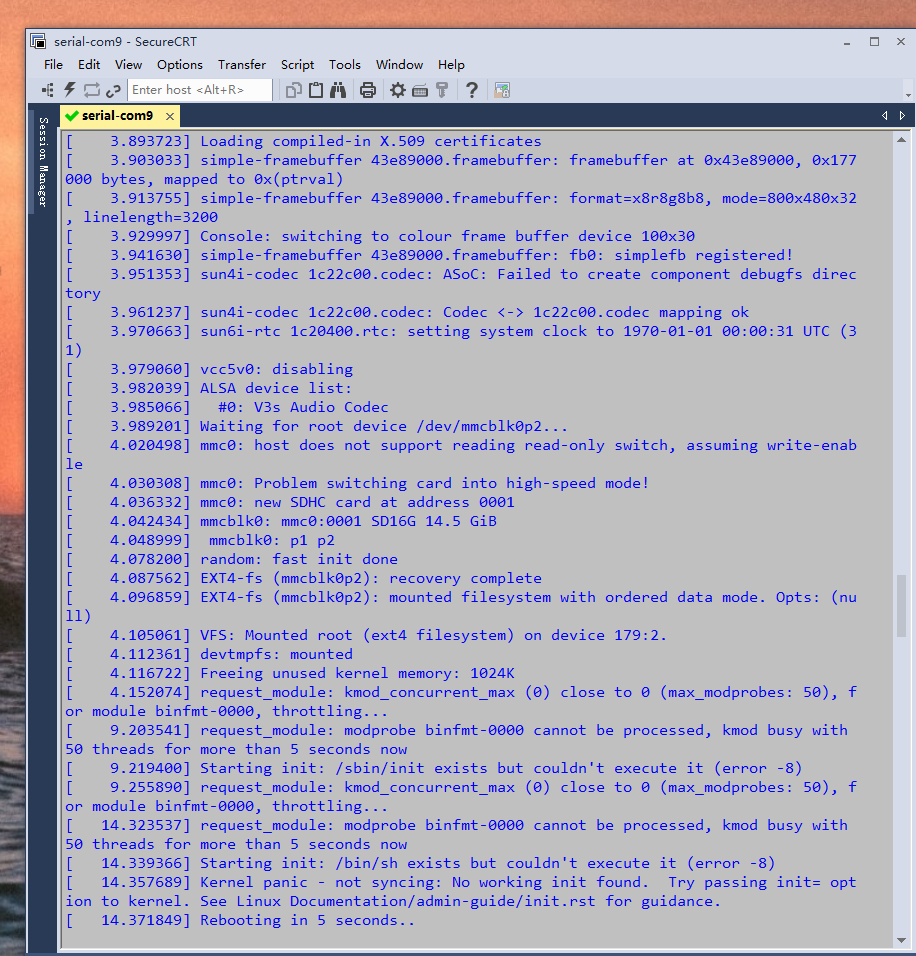
重复启动, 、sbin/init 不能执行?
#43 Re: 全志 SOC » dd 命令 打包, sunxi-fel烧写 » 2019-12-17 10:59:56
firstman wrote:
可能是超大之后, 回环把u-boot擦掉了。
你执行前5步试一试呗
不烧rootfs.bin ,是可以启动的
#44 Re: 全志 SOC » dd 命令 打包, sunxi-fel烧写 » 2019-12-17 10:20:57
晕哥 wrote:
最后一步有问题,你的rootfs超大了。
请教晕哥:rootfs 超大,dd打包后烧录到板子里,也应该有uboot启动信息呀
rootfs 后期还好加app呢,估计到时更大,这咋整呀
#45 Re: 全志 SOC » dd 命令 打包, sunxi-fel烧写 » 2019-12-17 10:11:39
晕哥 wrote:
只在“执行第一步,文件多大?
我怎么感觉第一步就错了呢
-rwxr-xr-x 1 v3s v3s 1.1M Dec 16 11:34 logo.bin
-rw-r--r-- 1 v3s v3s 12M Dec 16 17:53 rootfs.bin
-rw-r--r-- 1 v3s v3s 13K Dec 16 17:53 sun8i-v3s-licheepi-zero-with-800x480-lcd.dtb
-rw-r--r-- 1 v3s v3s 355K Dec 16 11:09 u-boot-sunxi-800x480LCD-spinor.bin
-rw-r--r-- 1 v3s v3s 17M Dec 16 17:53 v3s_nor_flash.bin
-rwxr-xr-x 1 v3s v3s 3.3M Dec 16 17:53 zImage
#46 全志 SOC » dd 命令 打包, sunxi-fel烧写 » 2019-12-17 09:50:54
- dml1048147924
- 回复: 11
开发板 SPI flash 是16M , 按以下打包,在win7烧录后,发现烧录了17433KB,开机没有任何反应,但是只烧uboot,是可以的。
这是为什么呢
dd if=/dev/zero of=v3s_nor_flash.bin bs=1M count=16
dd if=./u-boot-sunxi-800x480LCD-spinor.bin of=v3s_nor_flash.bin bs=1024 seek=0
dd if=./logo.bin of=v3s_nor_flash.bin bs=1024 seek=512
dd if=./sun8i-v3s-licheepi-zero-with-800x480-lcd.dtb of=v3s_nor_flash.bin bs=1024 seek=1856
dd if=zImage of=v3s_nor_flash.bin bs=1k seek=1920
dd if=rootfs.bin of=v3s_nor_flash.bin bs=1k seek=5376
#47 Re: 全志 SOC » 利用fswebcam抓取图像 » 2019-12-16 15:19:51
单眼皮小哥哥 wrote:
命令如下:fswebcam -d /dev/video1 --no-banner -r 640x480 image3.jpg
成功抓取到图片,但在Windows与linux下打不开图片,显示格式错误,请问这是命令哪里出问题了吗?
fswebcam 是怎么加入到荔枝派里的,求指点
#48 全志 SOC » 荔枝派zero USB摄像头 » 2019-12-16 14:05:21
- dml1048147924
- 回复: 1
请问,主线linux 用什么软件抓取usb摄像头数据
#49 Re: 全志 SOC » 入坑V3s camdroid编解码视频 » 2019-12-13 17:36:33
晕哥 wrote:
我觉得如果在V3s获取摄像头数据, 可以用Linux, 但是要进行视频编解码,那还是得上camdroid.
晕哥大神, bsp 内核 mipi 摄像头采集的图像 要想在LCD 上显示出来,就必须要用camdroid吗
#50 Re: 全志 SOC » licheepi zero BSP 内核(linux3.4) 编译教程 » 2019-12-13 13:50:21
按照楼主的步骤,从tf启动内核, 进入控制下lsmod ,没有发现module ,然后我自己进入目录下安装,insmod ov5647_mipi.ko ,
显示:unknown symbol in module, or unknown parameter
#51 Re: 全志 SOC » 荔枝派zero 摄像头 » 2019-12-13 11:16:29
液晶红绿蓝 wrote:
你可能找错地方了, 记得在别的菜单里面。
是的, 是在 sensor CSI -->里面
#52 Re: 全志 SOC » 荔枝派zero 摄像头 » 2019-12-13 11:08:22
晕哥 wrote:
对, 就是这些了。
@晕哥,根据荔枝派官网,支持ov5647,需修改sys_config.fex中的 【csi0】,可是文件里从610行,到733行,有两个【csi0】,是什么情况。
#53 Re: 全志 SOC » v3s bsp(linux3.4)下摄像头问题 » 2019-12-13 10:38:34
晕哥小弟 wrote:
BSP ov5647 我之前玩过,后来摄像头供应商说停产了...所以我们也换了....慎重
请问@晕哥小弟,荔枝派还有哪个 MIPI接口的摄像头可以用呢
#54 Re: 全志 SOC » licheepi zero BSP 内核(linux3.4) 编译教程 » 2019-12-13 10:04:09
晕哥 wrote:
后面还有很远的路要走, bsp linux 虽然驱动很全, 但是如果应用层不用 camdroid 架构, 视频编解码仍然会很麻烦,不过摄像头驱动还是很容易了。
晕哥, 你是说要想实现摄像头的使用, 必须要用坑卓架构吗 ,真这么坑吗
#55 Re: 全志 SOC » 荔枝派zero 摄像头 » 2019-12-12 17:16:25
晕哥 wrote:
有两种可能:
某些选项没勾选, 导致没有显示出来
可能Kconfig, Makefile 里面本来就没有, 要自己手动加入。
晕哥,在 内核源码目录: drivers/media/video/sunxi-vfe/device/ov2640.c
drivers/media/video/sunxi-vfe/device/ov5647_mipi.c
是摄像头驱动文件吗
#56 Re: 全志 SOC » 荔枝派zero 摄像头 » 2019-12-12 14:42:53
晕哥 wrote:
把你的路径列出来, 如上面的图片一样。
device drivers --> multimedia support-->video capture adapters -->v4L USB devices-->
--> v4L platform devices-->soc camera support --> 这个菜单下面
#57 Re: 全志 SOC » v3s bsp(linux3.4)下摄像头问题 » 2019-12-12 14:07:50
MTLINUX wrote:
又研究了2天,还是没有搞定BSP下ov5647. 路过的大神帮忙看看吧. 或者哪位能提供个IMG让我烧进去看看也行啊.
谢谢!怎么打印日志,不能发帖,提示: 标签不允许在其自身内部使用.
# dmesg| grep -e VFE  -e 5647
[    1.181372] [VFE]cci probe start cci_sel = 0!
[    1.186427] [VFE]cci probe end cci_sel = 0!
[    1.191236] [VFE]cci_init end
[    1.194634] [VFE]Welcome to Video Front End driver

[    1.200297] [VFE_DEBUG]vfe_probe
[    1.200434] [VFE]pdev->id = 0
[    1.203819] [VFE]dev->mipi_sel = 0
[    1.207700] [VFE]dev->vip_sel = 0
[    1.211492] [VFE]dev->isp_sel = 0

[    1.215347] [VFE_DEBUG]fetch sys_config1
[    1.215357] [VFE_DEBUG]dev->ccm_cfg[0] = c19f0494
[    1.215367] [VFE_DEBUG]dev->ccm_cfg[1] = c19f07a0
[    1.215381] [VFE_DEBUG]vip0 vip_dev_qty=1
[    1.215391] [VFE_DEBUG]vip0 vip_define_sensor_list=0
[    1.215444] [VFE_DEBUG]fetch vip_dev0_power_en from sys_config failed
[    1.215457] [VFE_DEBUG]fetch vip_dev0_flash_en from sys_config failed
[    1.215470] [VFE_DEBUG]fetch vip_dev0_flash_mode from sys_config failed
[    1.215483] [VFE_DEBUG]fetch vip_dev0_af_pwdn from sys_config failed
[    1.215502] [VFE_DEBUG]dev->ccm_cfg[0]->ccm = ov5647_mipi
[    1.215512] [VFE_DEBUG]dev->ccm_cfg[0]->twi_id = 0
[    1.215522] [VFE_DEBUG]dev->ccm_cfg[0]->i2c_addr = 6c
[    1.215532] [VFE_DEBUG]dev->ccm_cfg[0]->is_isp_used = 1
[    1.215541] [VFE_DEBUG]dev->ccm_cfg[0]->is_bayer_raw = 1
[    1.215551] [VFE_DEBUG]dev->ccm_cfg[0]->vflip = 0
[    1.215560] [VFE_DEBUG]dev->ccm_cfg[0]->hflip = 0
[    1.215569] [VFE_DEBUG]dev->ccm_cfg[0]->iovdd_str =
[    1.215577] [VFE_DEBUG]dev->ccm_cfg[0]->avdd_str =
[    1.215586] [VFE_DEBUG]dev->ccm_cfg[0]->dvdd_str =
[    1.215595] [VFE_DEBUG]dev->ccm_cfg[0]->afvdd_str =
[    1.215603] [VFE_DEBUG]dev->ccm_cfg[0]->act_used = 0
[    1.215611] [VFE_DEBUG]dev->ccm_cfg[0]->act_name = dw9714_act
[    1.215620] [VFE_DEBUG]dev->ccm_cfg[0]->act_slave = 0x18


[    1.221663] [VFE_WARN]vfe vpu clock is null

[    1.226412] [VFE_DEBUG]get io resource num = 3
[    1.226421] [VFE_DEBUG]get resource, name = csi
[    1.226439] [VFE_DEBUG]dev->regs.csi_regs = f1cb0000
[    1.226447] [VFE_DEBUG]get resource, name = isp
[    1.226458] [VFE_DEBUG]dev->regs.isp_regs = f1cb8000

[    1.226535] [VFE_DEBUG]isp load paddr = 42577000
[    1.226546] [VFE_DEBUG]isp load dma_addr = 02577000
[    1.226555] [VFE_DEBUG]isp load addr = c4a12000

[    1.226563] [VFE_DEBUG]isp saved paddr = 42578000
[    1.226571] [VFE_DEBUG]isp saved dma_addr = 02578000
[    1.226579] [VFE_DEBUG]isp saved addr = c4a16000

[    1.226586] [VFE_DEBUG]get irq resource

[    1.226614] [VFE_DEBUG]clock resource
[    1.226653] [VFE_DEBUG]vfe core clk = 297000000
[    1.226675] [VFE_DEBUG]get pin resource
[    1.233126] [VFE]vfe_init end


[    1.246383] [VFE]probe_work_handle start!
[    1.250943] [VFE_DEBUG]v4l2_device_register
[    1.250952] [VFE]..........................vfe clk open!.......................
[    1.277185] [VFE_DEBUG]vfe mipi csi clock  is null
[    1.277203] [VFE_DEBUG]v4l2 subdev register
[    1.277211] [VFE]v4l2 subdev register input_num = 0
[    1.282818] [VFE]vfe sensor detect start! input_num = 0
[    1.288715] [VFE]Find sensor name is "ov5647_mipi", i2c address is 6c, type is "RAW" !
[    1.297698] [VFE]Sub device register "ov5647_mipi" i2c_addr = 0x6c start!
[    1.305424] [VFE]v4l2_device_register_subdev return 0
[    1.311135] [VFE_DEBUG]ccm_cfg pt = c19f0494
[    1.311143] [VFE_DEBUG]ccm_cfg->sd = c1913080
[    1.311151] [VFE_DEBUG]module vflip = 0 hflip = 0
[    1.311160] [VFE_DEBUG]module vflip_thumb = 0 hflip_thumb = 0
[    1.311169] [VFE_DEBUG]module is_isp_used = 1 is_bayer_raw= 1
[    1.311176] [VFE]registered sensor subdev is OK!
[    1.316390] [VFE]Check sensor!
[    1.319952] [VFE]Sub device register "ov5647_mipi" is OK!
[    1.379762] [VFE]Check open /system/etc/hawkview/ov5647_mipi/isp_test_param.ini failed!
[    1.392979] [VFE]Match isp cfg ok
[    1.396840] [VFE_DEBUG]read ini end
[    1.396852] [VFE_DEBUG]dev->ccm_cfg[0] = c19f0494
[    1.396861] [VFE_DEBUG]dev->ccm_cfg[0]->sd = c1913080
[    1.396870] [VFE_DEBUG]dev->ccm_cfg[0]->power.iovdd =   (null)
[    1.396879] [VFE_DEBUG]dev->ccm_cfg[0]->power.avdd =   (null)
[    1.396888] [VFE_DEBUG]dev->ccm_cfg[0]->power.dvdd =   (null)
[    1.396896] [VFE_DEBUG]dev->ccm_cfg[0]->power.afvdd =   (null)
[    1.420354] [VFE]V4L2 device registered as video0
[    1.425804] [VFE]..........................vfe clk close!.......................
[    1.434148] [VFE_DEBUG]vfe mipi csi clock is null
[    1.434159] [VFE]probe_work_handle end!

[   14.446125] [VFE]vfe_open
[   14.449570] [VFE]..........................vfe clk open!.......................
[   14.461130] [VFE_DEBUG]vfe mipi csi clock  is null
[   14.461224] [VFE_DEBUG]isp_def_lut_tbl_vaddr[0] = c4a32000
[   14.461238] [VFE_DEBUG]isp_lsc_tbl_vaddr[0] = c4a32000
[   14.461248] [VFE_DEBUG]isp_gamma_tbl_vaddr[0] = c4a32600
[   14.461267] [VFE_DEBUG]isp_drc_tbl_vaddr[0] = c4a36000

[   14.461285] [VFE_DEBUG]dev->isp_stat_bq.isp_stat[i].isp_stat_buf.stat_buf[0] = c4a3a000
[   14.461304] [VFE_DEBUG]dev->isp_stat_bq.isp_stat[i].isp_stat_buf.stat_buf[1] = c4a40000
[   14.461322] [VFE_DEBUG]dev->isp_stat_bq.isp_stat[i].isp_stat_buf.stat_buf[2] = c4a46000
[   14.461341] [VFE_DEBUG]dev->isp_stat_bq.isp_stat[i].isp_stat_buf.stat_buf[3] = c4a4c000
[   14.461360] [VFE_DEBUG]dev->isp_stat_bq.isp_stat[i].isp_stat_buf.stat_buf[4] = c4a52000
[   14.461371] [VFE_DEBUG]tasklet init !

[   14.461379] [VFE]vfe_open ok

[   14.466701] [VFE_DEBUG]vidioc_s_fmt_vid_cap
[   14.466713] [VFE_DEBUG]try_fmt_internal
[   14.466732] [VFE_DEBUG]try bayer bus ok when pix fmt is bayer rgb at try_fmt_internal!
[   14.466743] [VFE_DEBUG]bus pixel code = 3019 at try_fmt_internal
[   14.466752] [VFE_DEBUG]pix->width = 1280 at try_fmt_internal
[   14.466761] [VFE_DEBUG]pix->height = 720 at try_fmt_internal
[   14.466770] [VFE_DEBUG]bus pixel code = 3019 at vidioc_s_fmt_vid_cap
[   14.466779] [VFE_DEBUG]pix->width = 1280 at vidioc_s_fmt_vid_cap
[   14.466788] [VFE_DEBUG]pix->height = 720 at vidioc_s_fmt_vid_cap
[   14.466803] [VFE]V4L2_MBUS_CSI2,2 lane,bus1 channel,rx 1 channel
[   14.490228] [OV5647_mipi]sensor_s_fmt
[   14.490495] [VFE CCI_0 ERR] Status error at addr_8bit = 6c, wr_flag = 0, val = ac070335
[   14.490745] [VFE CCI_0 ERR] Status error at addr_8bit = 6c, wr_flag = 0, val = ac070335
[   14.490993] [VFE CCI_0 ERR] Status error at addr_8bit = 6c, wr_flag = 0, val = ac070335
[   14.491004] [OV5647_mipi]sensor write retry=2
[   14.491246] [VFE CCI_0 ERR] Status error at addr_8bit = 6c, wr_flag = 0, val = acfa0f38
[   14.491492] [VFE CCI_0 ERR] Status error at addr_8bit = 6c, wr_flag = 0, val = acfa0f38
[   14.491737] [VFE CCI_0 ERR] Status error at addr_8bit = 6c, wr_flag = 0, val = acfa0f38
[   14.491747] [OV5647_mipi]sensor write retry=2
[   14.491990] [VFE CCI_0 ERR] Status error at addr_8bit = 6c, wr_flag = 0, val = ac000e38
[   14.492235] [VFE CCI_0 ERR] Status error at addr_8bit = 6c, wr_flag = 0, val = ac000e38
[   14.492480] [VFE CCI_0 ERR] Status error at addr_8bit = 6c, wr_flag = 0, val = ac000e38
[   14.492491] [OV5647_mipi]sensor write retry=2
[   14.492738] [VFE CCI_0 ERR] Status error at addr_8bit = 6c, wr_flag = 0, val = ac000832
[   14.492984] [VFE CCI_0 ERR] Status error at addr_8bit = 6c, wr_flag = 0, val = ac000832
[   14.493230] [VFE CCI_0 ERR] Status error at addr_8bit = 6c, wr_flag = 0, val = ac000832
[   14.493241] [OV5647_mipi]sensor write retry=2
[   14.493483] [VFE CCI_0 ERR] Status error at addr_8bit = 6c, wr_flag = 0, val = ac100b35
[   14.493728] [VFE CCI_0 ERR] Status error at addr_8bit = 6c, wr_flag = 0, val = ac100b35
[   14.493973] [VFE CCI_0 ERR] Status error at addr_8bit = 6c, wr_flag = 0, val = ac100b35
[   14.493984] [OV5647_mipi]sensor write retry=2
[   14.494226] [VFE CCI_0 ERR] Status error at addr_8bit = 6c, wr_flag = 0, val = ac000a35
[   14.494471] [VFE CCI_0 ERR] Status error at addr_8bit = 6c, wr_flag = 0, val = ac000a35
[   14.494717] [VFE CCI_0 ERR] Status error at addr_8bit = 6c, wr_flag = 0, val = ac000a35
[   14.494727] [OV5647_mipi]sensor write retry=2
[   14.494970] [VFE CCI_0 ERR] Status error at addr_8bit = 6c, wr_flag = 0, val = ac600235
[   14.495215] [VFE CCI_0 ERR] Status error at addr_8bit = 6c, wr_flag = 0, val = ac600235
[   14.495463] [VFE CCI_0 ERR] Status error at addr_8bit = 6c, wr_flag = 0, val = ac600235
[   14.495474] [OV5647_mipi]sensor write retry=2
[   14.495716] [VFE CCI_0 ERR] Status error at addr_8bit = 6c, wr_flag = 0, val = ac0f0135
[   14.495968] [VFE CCI_0 ERR] Status error at addr_8bit = 6c, wr_flag = 0, val = ac0f0135
[   14.496214] [VFE CCI_0 ERR] Status error at addr_8bit = 6c, wr_flag = 0, val = ac0f0135
[   14.496225] [OV5647_mipi]sensor write retry=2
[   14.496467] [VFE CCI_0 ERR] Status error at addr_8bit = 6c, wr_flag = 0, val = ac000035
[   14.496711] [VFE CCI_0 ERR] Status error at addr_8bit = 6c, wr_flag = 0, val = ac000035
[   14.496956] [VFE CCI_0 ERR] Status error at addr_8bit = 6c, wr_flag = 0, val = ac000035
[   14.496967] [OV5647_mipi]sensor write retry=2
[   14.497210] [VFE CCI_0 ERR] Status error at addr_8bit = 6c, wr_flag = 0, val = ac100832
[   14.497454] [VFE CCI_0 ERR] Status error at addr_8bit = 6c, wr_flag = 0, val = ac100832
[   14.497699] [VFE CCI_0 ERR] Status error at addr_8bit = 6c, wr_flag = 0, val = ac100832
[   14.497710] [OV5647_mipi]sensor write retry=2
[   14.497952] [VFE CCI_0 ERR] Status error at addr_8bit = 6c, wr_flag = 0, val = aca00832
[   14.498197] [VFE CCI_0 ERR] Status error at addr_8bit = 6c, wr_flag = 0, val = aca00832
[   14.498443] [VFE CCI_0 ERR] Status error at addr_8bit = 6c, wr_flag = 0, val = aca00832
[   14.498453] [OV5647_mipi]sensor write retry=2
[   14.598741] [VFE CCI_0 ERR] Status error at addr_8bit = 6c, wr_flag = 0, val = bc000001
[   14.598997] [VFE CCI_0 ERR] Status error at addr_8bit = 6c, wr_flag = 0, val = bc000001
[   14.599244] [VFE CCI_0 ERR] Status error at addr_8bit = 6c, wr_flag = 0, val = bc000001
[   14.599255] [OV5647_mipi]sensor write retry=2
[   14.599265] [OV5647_mipi]error at sensor_write_array
[   14.599273] [OV5647_mipi]error at sensor_s_fmt
[   14.599281] [VFE_ERR]v4l2 sub device s_fmt error!
[   14.605346] [VFE]vfe_close
[   14.609643] [VFE]vfe select input flag = 0, s_input have not be used .
[   14.617210] [VFE]..........................vfe clk close!.......................
[   14.625772] [VFE_DEBUG]vfe mipi csi clock is null
[   14.625826] [VFE]vfe_close end
@MTLINUX , bsp 3.4内核有ov5647摄像头吗,我编译的内核没有呀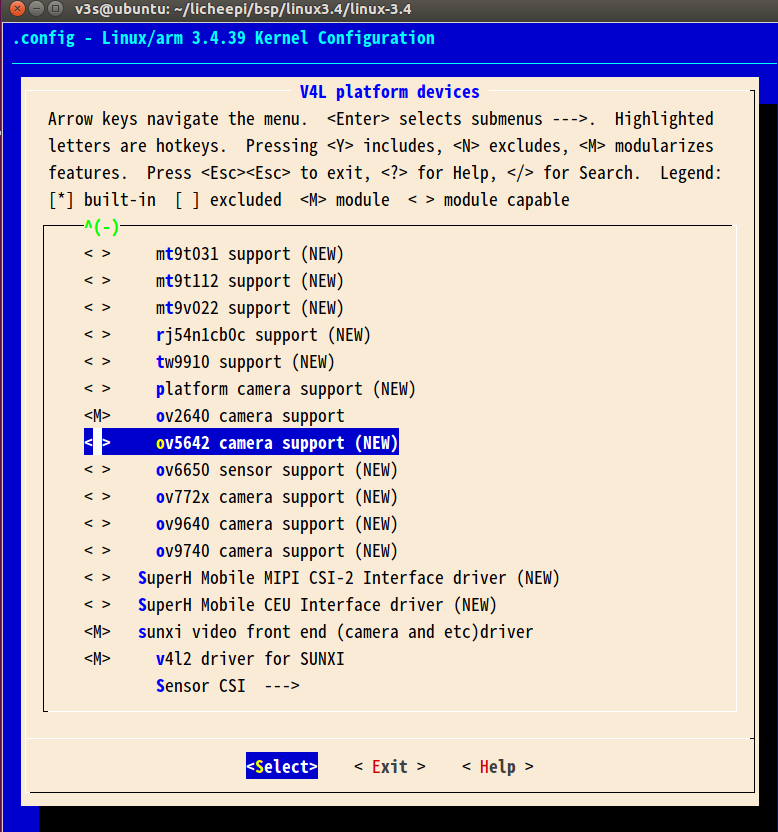
#58 Re: 全志 SOC » 荔枝派zero 摄像头 » 2019-12-12 14:03:14
液晶红绿蓝 wrote:
你可能找错地方了, 记得在别的菜单里面。
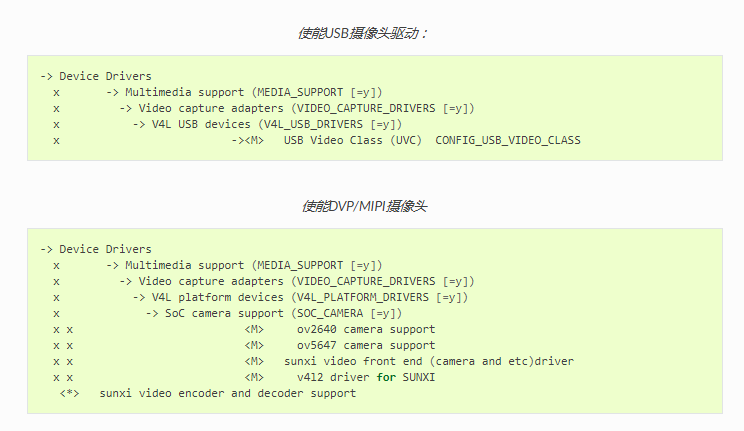
荔枝派官网就是这么个步骤呀
#59 Re: 全志 SOC » 荔枝派zero 摄像头 » 2019-12-12 13:09:24
晕哥 wrote:
实现应该挺复杂的,但是全志的bsp支持挺多mipi摄像头,只要在列表的都不用改代码。
bsp内核只有ov5642的摄像头配置, 荔枝派官网上的配置是ov5647,荔枝派淘宝卖的也是ov5647,
内核为啥没有支持ov5647 呢
#60 Re: 全志 SOC » licheepi zero BSP 内核(linux3.4) 编译教程 » 2019-12-12 11:25:27
达克罗德 wrote:
做dd镜像,荔枝派网盘有个脚本
windows下然后按照这个烧
http://www.orangepi.org/Docs/SDcardinstallation.html
我也想知道,怎么样 将1楼最后生成的 uboot,boot.bin.script.bin uimage ,rootfs 烧录进 flash ,
用dd命令主要不知道各个文件的偏移地址
#61 Re: 全志 SOC » licheepi zero BSP 内核(linux3.4) 编译教程 » 2019-12-12 10:41:33
BSP内核编译方式,不需要设备树给内核传参吗,
1.设备树里面有很多硬件信息,内核不需要知道吗,
2.将来如果修改硬件配置,没有设备树,怎么弄呢。
#62 Re: 全志 SOC » licheepi zero BSP 内核(linux3.4) 编译教程 » 2019-12-12 10:08:18
太一酱鸭 wrote:
怀疑你没看主楼,写的明明白白
应该是下面这句生成的
make ARCH=arm CROSS_COMPILE=arm-linux-gnueabi- uImage -j16
我之前也是按楼主的方法,编译了好几次没有生成, 然后今天又重新编译就生成了。
#63 Re: 全志 SOC » licheepi zero BSP 内核(linux3.4) 编译教程 » 2019-12-11 16:10:03
晕哥 wrote:
先用TF卡测试 没问题再用spi flash.
好的晕哥, 编译内核只能生成zimage ,是要用mkimage 生成uimage吗
#64 Re: 全志 SOC » licheepi zero BSP 内核(linux3.4) 编译教程 » 2019-12-11 15:29:36
按照1楼的做法,最后生成的 uboot, zimage ,boot.scr, script.bin 怎么烧录到SPI FLASH里呢, 偏移地址各是多少呢
#65 Re: 全志 SOC » licheepi zero BSP 内核(linux3.4) 编译教程 » 2019-12-11 13:55:46
按照1楼方法:cp lichee_BSP_config .config
make ARCH=arm CROSS_COMPILE=arm-linux-gnueabi- uImage -j16
编译内核,并没有生成uImage ,只生成了zImage, 有谁知道咋回事吗
#66 Re: 全志 SOC » licheepi zero BSP 内核(linux3.4) 编译教程 » 2019-12-11 13:44:38
晕哥 wrote:
可以.
我说错了, 楼主编译内核用的arm-linux-gnueabi-, 不带后缀xxhf-
#67 Re: 全志 SOC » licheepi zero BSP 内核(linux3.4) 编译教程 » 2019-12-11 13:19:47
编译uboot 和内核,用的交叉编译工具链不一样吗,楼主 编译uboot 用arm-linux-gnueabihf-,
编译内核用arm-linux-gnueabihf-?
#68 Re: 全志 SOC » licheepi zero BSP 内核(linux3.4) 编译教程 » 2019-12-11 13:16:11
呵哈呵哈 wrote:
这个是 sunxi-tools, https://whycan.cn/t_444.html
cd tool/sunxi-tools make 之后有啥效果呀
#69 Re: 全志 SOC » licheepi zero BSP 内核(linux3.4) 编译教程 » 2019-12-11 11:48:55
sudo apt-get install libusb-1.0-0-dev
cd tool/sunxi-tools
make
楼主 cd too/sunxi-tools 指的文件路径是uboot 下的tools/ 目录吗, 没有tool/sunxi-tools目录呀
#70 Re: 全志 SOC » licheepi zero BSP 内核(linux3.4) 编译教程 » 2019-12-11 11:29:13
晕哥 wrote:
要不你先找台64bit试一试?
晕哥,我换了一个虚拟机,ubuntu16。04 LTS ,64bit 的就可以编译了,
但是编译生成了zImage, 没有生成uImage
#71 Re: 全志 SOC » licheepi zero BSP 内核(linux3.4) 编译教程 » 2019-12-11 11:26:13
呵哈呵哈 wrote:
按你的办法,可以用,谢谢
#72 Re: 全志 SOC » licheepi zero BSP 内核(linux3.4) 编译教程 » 2019-12-11 10:04:02
晕哥 wrote:
要不你先找台64bit试一试?
晕哥,
请问:
编译报错:include/linux/compiler-gcc.h:100:30: fatal error: linux/compiler-gcc5.h: No such file or directory
compilation terminated.
#73 Re: 全志 SOC » licheepi zero BSP 内核(linux3.4) 编译教程 » 2019-12-10 15:41:18
晕哥 wrote:
这就尴尬了,前几天有网友也是相同的问题。
这个文件是全志提供的一个无源码的二进制文件,应该是32bit的,
你看下你的系统是多少位的,或许是 32/64bit兼容问题。
我的ubuntu14.04 是i686 ,是32位的
#74 Re: 全志 SOC » licheepi zero BSP 内核(linux3.4) 编译教程 » 2019-12-10 15:25:52
晕哥 wrote:
搜了一圈, 找到这个页面: https://linux-sunxi.org/A33_Suspend
貌似说用这里面的 gen_check_code:
https://github.com/allwinner-zh/sunxi-tools/tree/master/tools-for-kernel-standby代替出错的 arch/arm/mach-sunxi/pm/standby/gen_check_code
你试一试, 看是不是这个意思。
晕哥,还是报同样的错误
#75 Re: 全志 SOC » licheepi zero BSP 内核(linux3.4) 编译教程 » 2019-12-10 14:53:23
晕哥, boot.scr, script.bin 也要提供加载地址是吗
#76 Re: 全志 SOC » 荔枝派zero tf卡启动 » 2019-12-10 14:51:29
dml1048147924 wrote:
我重新换了tf卡,制作了tf卡启动,还是报同样的错误
我又换一个tf卡,好用了。
#77 Re: 全志 SOC » licheepi zero BSP 内核(linux3.4) 编译教程 » 2019-12-10 14:32:02
晕哥 wrote:
我当时用的就是楼主提供的
一直报下面的错误
arch/arm/mach-sunxi/pm/standby/gen_check_code: 1: arch/arm/mach-sunxi/pm/standby/gen_check_code: Syntax error: end of file unexpected (expecting ")")
make[3]: *** [arch/arm/mach-sunxi/pm/standby/resume1.code] Error 2
make[2]: *** [arch/arm/mach-sunxi/pm/standby/standby.code] Error 2
make[1]: *** [arch/arm/mach-sunxi/pm] Error 2
make: *** [arch/arm/mach-sunxi] Error 2
#78 Re: 全志 SOC » licheepi zero BSP 内核(linux3.4) 编译教程 » 2019-12-10 14:17:30
晕哥 wrote:
TF卡亲测通过, 感谢楼主!
上面的文件 QianHao_V3s_BSP内核_20180111.7z 有点问题, 缺 u-boot, boot.src 不正确.
这个软件包确实是正常的: V3s主线u-boot引导官方linux,带Qt文件系统,网卡已测试.7z
晕哥, 楼主提供的内核编译报错,请问哪有linux3.4的源码
#79 Re: 全志 SOC » licheepi zero BSP 内核(linux3.4) 编译教程 » 2019-12-09 11:25:02
晕哥 wrote:
那你是想把楼主这种做法移植到spi nor flash对吧,
我晚点研究一下。
难度应该不大,你可以试一试,有什么好消息可以分享上来。
晕哥,如果用windows下的sunxi-fel.exe 烧录 uboot,boot.scr, script.bin,uimage,rootfs.bin 怎么烧录,
应为从tf卡启动不了,我想试试烧录到SPI flash 里试试
#80 Re: 全志 SOC » buildroot 与busybox » 2019-12-07 15:17:40
晕哥 wrote:
会的
晕哥,请教一下:
我在buildroot根目录下,make ,然后生成output/build/busybox/
然后我在busybox目录下更改了某个xxx.c文件,再次在buildroot根目录执行make, 此时xxx.c文件对应的xxx.o文件,并没有更新,
这是为什么呢。
#81 Re: 全志 SOC » 荔枝派zero tf卡启动 » 2019-12-06 16:12:05
还能这么玩 wrote:
Verifying Checksum ... Bad Data CRC
ERROR: can't get kernel image!
SCRIPT FAILED: continuing...
starting USB...怀疑你的卡有问题, 换张卡。
我重新换了tf卡,制作了tf卡启动,还是报同样的错误
#82 Re: 全志 SOC » 荔枝派zero u-boot 启动过程 » 2019-12-06 15:13:25
有没有分析荔枝派zero 从uboot 启动过程的帖子呢
#83 Re: 全志 SOC » 荔枝派zero tf卡启动 » 2019-12-06 15:10:08
晕哥,用您上面的固件,然后报错了
#84 全志 SOC » 荔枝派zero tf卡启动 » 2019-12-06 11:33:55
- dml1048147924
- 回复: 5
使用 https://whycan.cn/t_561.html,做TF启动,做好之后插到开发板没有任何反应,换一个tf卡,还是不行,
使用楼主的 V3s_TFCard.7z 制作tf卡启动也不行。
不知道为什么
#85 Re: 全志 SOC » licheepi zero BSP 内核(linux3.4) 编译教程 » 2019-12-06 09:35:08
重新编译,没有解决,52楼也碰上了同样问题
#86 Re: 全志 SOC » licheepi zero BSP 内核(linux3.4) 编译教程 » 2019-12-05 17:54:38
编译内核报错:
arch/arm/mach-sunxi/pm/standby/gen_check_code: 1: arch/arm/mach-sunxi/pm/standby/gen_check_code: Syntax error: end of file unexpected (expecting ")")
make[3]: *** [arch/arm/mach-sunxi/pm/standby/resume1.code] Error 2
make[2]: *** [arch/arm/mach-sunxi/pm/standby/standby.code] Error 2
make[1]: *** [arch/arm/mach-sunxi/pm] Error 2
make: *** [arch/arm/mach-sunxi] Error 2
请问是什么情况
#87 Re: 全志 SOC » uboot 编译报错 » 2019-12-04 17:08:15
晕哥 wrote:
分支
谢谢晕哥,
论坛里有没有关于uboot启动过程的分析,求推荐
#88 Re: 全志 SOC » uboot 编译报错 » 2019-12-04 16:50:31
晕哥 wrote:
前面的操作可能有问题,现在找不到板子对应的头文件
官网下的uboot 居然没有 LicheePi_Zero_defconfig ,我在别的地方找的
请问 -b v3s-spi-experimental 是啥意思呀
#89 全志 SOC » uboot 编译报错 » 2019-12-04 16:36:46
- dml1048147924
- 回复: 5
从 git clone https://github.com/Lichee-Pi/u-boot.git -b v3s-spi-experimental 下载的uboot,编译报错
scripts/kconfig/conf --silentoldconfig Kconfig
CHK include/config.h
CFG u-boot.cfg
In file included from ./include/common.h:21:0:
include/config.h:5:22: fatal error: configs/.h: No such file or directory
#include <configs/.h>
^
compilation terminated.
make[1]: *** [u-boot.cfg] Error 1
make: *** No rule to make target include/config/auto.conf', needed by include/config/uboot.release'. Stop.
#90 Re: 全志 SOC » 荔枝派zero 摄像头 » 2019-12-04 11:49:54
晕哥 wrote:
V3s芯片是复印的,如果用S3 分开了,dvp和mipi,lcd三者可以同时使用。
请问:
如果将DVP接口的功能映射到其他GPIO是不是就可以用摄像头了
晕哥,不同的摄像头,驱动是不一样的吗
#91 Re: 全志 SOC » 荔枝派zero 摄像头 » 2019-12-04 10:47:53
晕哥 wrote:
对, mipi 就是 csi2
荔枝派官网说
Zero的DVP CSI接口引脚和RGB引脚复用的,是吗
#92 Re: 全志 SOC » 荔枝派zero 摄像头 » 2019-12-04 10:33:19
请问:
dvp驱动用的是 CSI 接口, mipi 驱动用的是CSI2吗,我查看datasheet 里面有CSI 和CSI2两个接口
#93 Re: 全志 SOC » 荔枝派zero 摄像头 » 2019-12-04 09:55:04
晕哥 wrote:
实现应该挺复杂的,但是全志的bsp支持挺多mipi摄像头,只要在列表的都不用改代码。
晕哥上神,
我用的是linux4.18.8 ,一般内核里是不是都有摄像头的驱动呢,
主线linux内核为什么不支持摄像头驱动呢。
求大神科普。
#94 Re: 全志 SOC » 荔枝派zero 摄像头 » 2019-12-03 17:25:15
晕哥 wrote:
看需求,mipi的当然也好,usb摄像头拔插方便
请问: MIPI 的摄像头驱动配置起来复杂吗
#95 全志 SOC » 荔枝派zero 摄像头 » 2019-12-03 15:58:30
- dml1048147924
- 回复: 23
请问大神:
荔枝派zero 有个 MIPI CSI2 是接摄像头的接口吗,
UVC类的摄像头好,还是这种接口的好,我不懂
#96 Re: 全志 SOC » 荔枝派zero u-boot 启动过程 » 2019-12-03 09:58:35
uboot 一般情况下不是这样启动的呀,我用的荔枝派zero
#97 全志 SOC » 荔枝派zero u-boot 启动过程 » 2019-12-03 09:38:17
- dml1048147924
- 回复: 4
请问大家:
uboot 刚开始启动时,是这样调用的吗:
先使用 u-boot-spl.lds(arch/arm/cpu/armv7/sunxi/u-boot-spl.lds),然后找到
vectors.S(arch/arm/lib/vectors.S)
2.--> start.S(arch/arm/cpu/armv7/start.S)cpu_init_cp15
4.--> cpu_init_crit(arch/arm/cpu/armv7/start.S)
|--> lowlevel_init
#98 Re: 全志 SOC » buildroot 与busybox » 2019-11-29 16:42:44
output/target 目录会被制作成最终的 rootfs.rar镜像吗
#99 全志 SOC » buildroot 与busybox » 2019-11-29 16:12:58
- dml1048147924
- 回复: 8
在buildroot 下make编译时,是怎么样把 output/build/busybox(譬如,我在busybox根目录下make menuconfig 更改了某个配置项) 编译到最终的rootfs镜像里的。
#100 Re: 全志 SOC » 荔枝派zero USB功能 » 2019-11-27 15:16:39
晕哥 wrote:
你硬件上的 usb-id 脚和 dts 的配置不一致。
你要么硬件和荔枝派改一致, id接PF6,
要么改 dts 的 usb-id 引脚设置。
如果你的硬件不要切换 otg device/host 就直接上拉/下拉 都可以。
晕哥,我不想用USB OTG 功能,荔枝派不作为从设备,只作为主设备,就是用USB标准的接口,不用OTG功能。
请问设备树里关于 usb-id 的怎么改
#101 Re: 全志 SOC » 荔枝派zero 内核启动时间过长 » 2019-11-27 10:52:01
晕哥,这是我的内核加载过程, 从 random: crng init done
到 [ 9.986599] jffs2: notice: (1) jffs2_build_xattr_subsystem: complete build......
间隔了6秒,不知道为什么。
#102 全志 SOC » 荔枝派zero 内核启动时间过长 » 2019-11-27 09:23:28
- dml1048147924
- 回复: 3
荔枝派zero 内核启动时间要十几秒,怎么样才能缩短启动时间
#103 Re: 全志 SOC » 荔枝派zero USB功能 » 2019-11-26 14:34:55
谢谢晕哥上神,按照您给的思路,usb功能改好了。
#104 Re: 全志 SOC » 荔枝派zero USB功能 » 2019-11-22 16:17:49
晕哥大神,你上面回复的关于USB-ID引脚在设备树种有配置,没有找到,可以指点一下在哪个文件里吗
#105 Re: 全志 SOC » 荔枝派zero USB功能 » 2019-11-22 09:13:36
谢谢晕哥上神。 再请教一下: 我们图纸上的是USB OTG口,所以为了插U盘,用了转接头,将OTG转标准USB口,
这样测试有什么不妥吗
#106 Re: 全志 SOC » 荔枝派zero USB功能 » 2019-11-21 17:14:17
V3s ver1_2.pdf
这是我们的板子原理图,晕哥大神可以帮忙看一吗,关于TF卡和USB的
#107 全志 SOC » 荔枝派zero USB功能 » 2019-11-21 15:51:28
- dml1048147924
- 回复: 15
只有将TF卡插到板子上,USB功能才能用;不插TF卡,将u盘插到板子上没反应,这是为什么。
#108 Re: 全志 SOC » 用TF卡制作启动介质,启动荔枝派ZERO,启动不了 » 2019-11-21 11:07:41
刚开始制作过一次启动介质,是可以用的, 后来再重新制作,发现从TF卡启动失败
#109 全志 SOC » 用TF卡制作启动介质,启动荔枝派ZERO,启动不了 » 2019-11-21 10:38:09
- dml1048147924
- 回复: 3
制作启动盘后,插入到板子里,报错:
SPL: unsupported boot device!
SPL: failed to boot from all boot devices.
###ERROR######
#110 Re: 全志 SOC » 荔枝派 zero 内核启动不了 » 2019-11-18 16:29:41
我就是在 配置内核时,通过 make menuconfig ,然后就在里面改了几个配置项,别的什么也没动,
内核就起不来了
#111 全志 SOC » 荔枝派 zero 内核启动不了 » 2019-11-18 16:17:13
- dml1048147924
- 回复: 3
开机,内核停留在start kernel.....
#112 Re: 全志 SOC » 荔枝派zero USB驱动 » 2019-11-14 15:38:40
万能的晕哥,我用的荔枝派zero需要USB功能,是不是只要在内核里配置一下就可以了,还是说要手动更改驱动,
百度里搜索了很久,都不行。
#113 Re: 全志 SOC » 荔枝派zero USB驱动 » 2019-11-14 13:44:49
晕哥,请问配置linux 内核支持USB功能,是不是和具体的开发板型号没有关系呀
#114 Re: 全志 SOC » 荔枝派zero USB驱动 » 2019-11-13 14:13:02
晕哥好!你给的链接里的内容是关于FIC100s的,而且也没有移植步骤,看不懂;
我用的板子是荔枝派zero的,不知道怎么搞,才能让USB功能正常使用。
#115 全志 SOC » 荔枝派zero USB驱动 » 2019-11-13 13:47:23
- dml1048147924
- 回复: 7
我是小白,请问各位大神:
荔枝派zero USB驱动要自己编写吗,还是说linux内核已经带了。
页次: 1
- 首页
- » 搜索
- » dml1048147924 发表的帖子
东莞哇酷科技有限公司开发